




EX6100
Product ID: 431803
Details
- BrandNETGEAR
- ColorWhite
- Data Transfer Rate750 Megabits
- Frequency Band ClassDual-Band
- Wireless Communication Standard
⚡750Mbps dual-band AC750 speed
📶1000 sq.ft coverage
🔗Connects up to 15 devices
🚀 Elevate your WiFi game—never miss a beat or a byte!
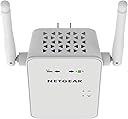
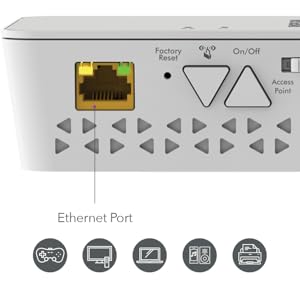
The NETGEAR EX6100 AC750 WiFi Mesh Range Extender boosts your wireless coverage up to 1000 sq.ft, supports up to 15 devices simultaneously, and delivers speeds up to 750Mbps via dual-band technology. Featuring seamless mesh smart roaming, universal compatibility, and a wired Gigabit Ethernet port, it ensures reliable, high-speed connectivity throughout your home or office. Easy setup through the Nighthawk app makes it the perfect solution to eliminate dead zones and keep you connected without interruption.









| ASIN | B00HHRP11C |
| Best Sellers Rank | #846 in Repeaters |
| Brand | NETGEAR |
| Built-In Media | Ac750 Wi-Fi Range Extender, Installation Guide |
| Color | White |
| Compatible Devices | Router |
| Connector Type | RJ45 |
| Customer Reviews | 4.0 out of 5 stars 3,955 Reviews |
| Data Transfer Rate | 750 Megabits Per Second |
| Frequency Band Class | Dual-Band |
| Frequency Bands Supported | 2.4 GHz, 5 GHz |
| Global Trade Identification Number | 00606449100709, 00801940481009, 10606449100737 |
| Item Dimensions D x W x H | 3.98"D x 5.71"W x 7.09"H |
| Item Weight | 0.39 Kilograms |
| Manufacturer | Netgear |
| Mfr Part Number | EX6100-100NAS |
| Model Number | EX6100-100NAS |
| Range | feet |
| UPC | 801940481009 804904108981 606449100730 012304667810 804067305555 809394591770 606449100709 808112944485 |
| Unit Count | 1.00 Count |
| Warranty Description | Comes with Manufacturer Warranty. |
| Wireless Communication Standard | 802.11a/b/g/n/ac |
| Wireless Compability | 802.11a/b/g/n/ac |
N**Y
Best solution for extending WiFi - read this review to understand why
As I said in one of my previous reviews, buying technical products based on Amazon ratings can be pretty frustrating. NETGEAR EX6100 AC750 is a great example of why that is. Most of the complaints that you'll find in 1 star reviews are based on misunderstanding on how this type of product works. If you'll use this piece of hardware to extend your WiFi coverage - expect 50% less bandwidth when you connect to it since it uses that 50% to communicate with router. If you need 100% speed, you do have alternatives: 1. This devices supports Access Point mode. Simply move slider from Extender to Access Point, connect LAN cable to this device and then use same SSID and password for WiFi. 2. If you don't want to spend time laying LAN cable, you can use one band (2.4 GHz) to communicate with router and other one (5 GHz) to communicate with devices. This can be problematic because most of the devices support only 2.4 GHz... and 5 GHz band signal will tie you closer to router. 3. Finally, you can try with other devices like TP-LINK AV500 that utilize powerline: http://www.amazon.com/gp/product/B00AWRUICG/ref=as_li_tl?ie=UTF8&camp=1789&creative=390957&creativeASIN=B00AWRUICG&linkCode=as2&tag=codeproject-20&linkId=5LNJ5PAFCLAMLAIG In my case, this product was the best option because even with 50% dropdown in communication I get 15 MBit/s Internet (instead of 30 MBit/s Internet). And when I have time to spare I'll connect it with LAN cable. On the other hand, TP-LINK AV500 would require me to connect WiFi router / buy WiFi add-on at endpoint (since it is powerline + LAN). So, if you have problems with WiFi coverage, this is probably the BEST solution for you. If you need to connect just one device using LAN cable in some remote place in your home, powerline may work (it depends on how your power lines are installed, I had really bad experience with powerline tech). Just whatever you do, do not buy extra antennas for your router. I've left two detailed reviews on products that I've tried out and their price ($20+) is way too much for what they offer. Here are the reviews I mention, they contain more recommendations on EX6100: Asus WL-ANT-157 Antenna: http://www.amazon.com/gp/customer-reviews/R17FRD2FTCRJIB/ref=as_li_ss_tl?ie=UTF8&ASIN=B005UBNJ48&camp=1789&creative=390957&linkCode=ur2&tag=codeproject-20&linkId=DGRPI7ZB4KW6LULE 3 x 9dBi 2.4GHz 5GHz Dual Band WiFi RP-SMA Antenna: http://www.amazon.com/gp/customer-reviews/R1R1FM9PYRM8VM/ref=as_li_ss_tl?ie=UTF8linkCode=ur2&tag=codeproject-20&linkId=TUFLTMG2TA7W7DYR&ASIN=B00DMJI9TA&camp=1789&creative=390957& Speaking of price, another VERY important point - buy REFURBISHED EX6100 (~$40). Devices like this are highly unlikely to malfunction - because of low heat generation and no mechanical parts. If they work within 90 days (refurbished guarantee period)... it's highly likely they'll work for years without problems. Let that be it for this review. If you have any questions, feel free to leave comment and I'll try to answer. For example, I see few reviews mention that EX6100 doesn't allow you to setup same SSID/password as your primary network, and have your devices autoswitch. That's simply untrue - you can easily setup same SSID/password in EX6100 administration. Finally, if this review helped you, I would appreciate marking it as helpful. Whatever you decide, good luck with your WiFi network!
T**Y
Cures buffering and dropping signals at 5.0 GHz
In May of 2014 I cut the cord on my Direct TV account because of their constant broken promises of account credits by their "Customer Care" group never being reflected in my billings, so I decided to go WiFi along with air antenna's. My first venture into this was with a D-Link 2.4 GHz unit router that was OK for TV's close by, so I tried two different brands of 2.4 GHz range extenders to provide service to my main TV which is a 60" Smart LG unit at the opposite end of my home in the family room and out of range of my router installed in my home offce. One from D-Link and one from Netgear. Both of these proved to be unsatisfactory because my main TV was continually buffering and losing connections which I suspect is due to the neighbors 2.4 GHz WiFi signals interfering and stepping on my signal. Next I went with a 2.4/5.0 GHz dual range router from D-Link (DIR-817LW) and this Netgear AC750 range extender. Setup was very straight forward following the instructions and after I had programmed it for both 2.4/5.0 GHz channels by pressing the WPS button on the side of the AC750 and then pressing the WPS button on my DIR-817 first for 2.4 GHz and then repeating the same steps for 5.0 GHz after confirmation of the 2.4GHZ LED indicator light, I moved it to a kitchen outlet about 18 feet from my main TV in the family room. When I went to my main TV and searched for signals I found both of the new 2.4GHz and 5.0 GHz signals and selected the 5.0 GHz signal. WHAT A HUGE IMPROVEMENT!! Suddenly my WiFi channels like Netflix, Pandora, Amazon Prime, Hulu, Vudu all came in practically instantaneously and crystal clear with no buffering and no dropping of connection. Another great thing is it kept the same pass word that my DIR-817 router uses. All I can say is where have you been all my life? I cannot say enough good about this gem. Strongly recommend this unit with no reservations.
V**H
Reasonably easy to set up, provides good coverage as an access point but is large, bulky and heavy.
I was using an older version of a Netgear Extender WNT1000 that only had 2G and no antennas. It is small, elegant and has worked well to cover the dead spots until recently. So I replaced it with this one. I have many rooms in the house hard wired for internet with a hardwired router in the basement. The top floor home office has a Netgear Nighthawk set up to provide the wireless to the house, though there are still some dead zones. I installed this product as an Access Point with the same SSID names as my existing 2G & 5G and with the ethernet cable in as mentioned in the instructions and by another reviewer. I set it up plugged into the Nighthawk first then moved it to the appropriate room. As I am not really technical I do not know why going to the web page provided in the instructionss when I was setting up would not work. So I use Netgear Genie on my laptop to tell me the 192.xxx.x.xxx number that it was using and logged in that way. I set up a static number so it would not change on me and I have to use that to log on to change settings rather than the webpage. Maybe this has something to do with it being set up whilst plugged into the Nighthawk vs the wired router in the basement. After set up, I moved it downstairs and plugged it in and it worked immediately. A Roku TV in the dead zone could now detect both the 2G and 5G. My phone connected to both 2G & 5G and as I moved about the 3 story-house the bars remained consistant. This thing is large and heavy especially by comparison to my older extender. In the room where the extender is located I have a three gang outlet on the built-in cabinet's shelf wall - one for the light switch, one for the ethernet and cable and the other for the electric outlet. This unit cannot be plugged into the electrical outlet as it would block the light switch and cable gang. I am going to have to figure out a power strip mounted to the wall just for it that will accommodate its size.
D**2
Geat WiFi Extender!!!
I've been using the Netgear AC750 for a while now, and it has been wonderful!!! I love this WiFi extender, and everything about it! I know there are so many reviews about this particular networking device, that my review will most likely go un-read and un-noticed, and thats just fine with me. I mainly want to convey my satisfaction with this Netgear Extender, how well it works, and how easy it was (for me), to get running. I do emphasize the "for me" part, because I do have a lot of experience in setting up networks, and all of the security protocols. Setting up secure networks can be a very tricky job, even for the most savvy computer techs. Years ago, I was one of those that thought I knew it all, and tried to setup my first secure network...I screwed it up. I've been building PC's for years, and had no idea there was so much involved in setting up a network. So I read, and then read some more....and then even more... I say this because there are a lot of bad reviews for this Netgear Extender...A Lot! This really is, a very good piece of hardware. I have read about half of the bad reviews, and though it is unfortunate, I see that most, if not all, are due to user error, and nothing else, except for very poor customer service help from Netgear Support. I really do blame the poor customer support from Netgear, more so, than I do the user error. If your going to sell networking hardware, your need qualified support staff, and it seams as though Netgear is answering questions using poorly written, form letter style, cheat sheets, and not speaking from experience, as they should! Now with that said, they do have a "genie" that you can use to take you through the basic setup, and be done with it. I didn't, and haven't used there Genie, so I can't really comment on how well it works, or how good of a job it does. I set mine up in advanced mode. Well, I set up my router in advanced mode and then added my extender to it, but it works just great, and I use WPA2-PSK, AES. I've also got NAS enabled with MAC address filtering, among other features. My best advice would be, if your new to router setup, and extender additions, ask around your circle of friends, and see if you can find someone who's done this type of setup before, and see if they could come over for a bit and just take a look at what you have, and what you want to do. I use mine in a long ranch style home, with my router at the far west end. I know it should be centralized...but it's not. My network consists of 1-Netgear Router , this (AC750) Netgear Extender, 2 laptops, a couple of Apple products, and 4 WiFi enabled cameras ( Dropcam Pro ) My router covers most of my house very strongly. But...I have 1 Dropcam at the far, opposite end, and with a signal thats just slightly degraded, due to distance, thats where this extender comes into play. Now, what was a slightly pixelated video feed, is now a very sharp detailed video feed. This can be a hair pulling event, if your not prepared!!! Bottom line is, this is a very good WiFi extender, and I'd highly recommend it to anyone who asked me.
A**E
Need an alternative
After using it for a week, I cannot confirm NETGEAR AC750 is great or decent because maybe I didn't utilize the 802.11ac protocol. Since I paid ~$70, at first, I thought it must perform better than my original cisco RE1000 but instead what I really paid for the dual band at both 2.4GHz and 5.0GHz. As for range extender, it worked as described and extended the range and I got strong signal to every corner of my house but signal strength isn't everything. However for the throughput, it came far less than what I thought. I was a little frustrated considering this product has such good review and thinking that for this price must be a decent product then I researched some more and realized that the repeater would have minimum of 50% throughput loss because there loss between the repeater and router then loss between repeater and my PC. For casual use this is fine but then again for casual use I am also satisfied with a $20 - $30 range extender which what I currently have. I hoped that the dual band (which matched my router) would give me better option since at 5GHz, I would get better throughput for more bandwidth than the 2.4GHz. However, 5GHz is only good for a short distance as it increase distance with wall/duct interference, the signal and throughput decreases so this is pretty much useless over long distance. So I did a little test one saturday morning (less traffic times, just in case my neighbors and I are using the same channel) with the throughput data below: Control/Baseline: PC in the same room as router (TP-LINK TL-WDR4300) connect to router's WiFi (located upstairs, 2nd floor, on one side of the house) 29.97Mbps Download 28.92Mbps upload Router's WiFi: @ 5GHz, PC using WiFi directly connected to router in living room (located downstairs, 1st floor, on the other side of the house) 19.12Mbps Download 27.77Mbps Upload NETGEAR AC750: @ 5GHz, connect to range extender in living room 8.49Mbps Download 14.31Mbps Upload Router WiFi: @ 2.4GHz, Wi-Fi directly connected to router in living room 20.55Mbps Download 23.63Mbps Upload NETGEAR AC750: @ 2.4GHz, connect to range extender in living room 11.35Mbps Download 10.35Mbps Upload From the data above, at 5GHz, there is loss due to the distance and interference between the separators (walls/floor). By connecting directly to Wi-Fi of the router (showed the base loss of transmit thru walls): Download speed, I have a loss of 36.2% for directly to router WiFi; Upload speed, I have loss of 4.0% for directly to router WiFi. The actual loss in the same room for the difference using NETGEAR AC750 divided by directly to router's WiFi: Download speed loss is 55.5% and Upload speed loss is 48.4%. That is significant amount of loss considering I have signal loss to the Range extender and total loss from the original signal more than 80% with full bar of signal!!!! At 2.4GHz, in principle, the range should be better than the 5GHz but the bandwidth is lower. By connecting directly to Wi-Fi of the router (showed the base loss of transmit thru walls): Download speed, I have a loss of 31.4% for directly to router WiFi; Upload speed, I have loss of 18.3% for directly to router Wi-Fi. The actual loss in the same room for the difference using NETGEAR AC750 divided by directly connect to router's WiFi: Download speed loss is 44.8% and Upload speed loss is 56.2%. This actually performed better than the 5GHz and again I was getting full signal bar strength with a loss of more than 70%!!!! In short, there loss between the repeater and router also loss between repeater and my PC so the best case scenario is 50% loss as mentioned before and shown in the data. Using the signal from this range extender, I am getting more than 70% loss. To make matters worse during high traffic times or when the signal is unstable (e.g. when neighbors and I are sharing some of the same channel), I've been getting 1Mbs Downloads and upload. I mean sure, it was easy to setup and user friendly or whatever but I'm not paying for pretty packaging. I need a solid/real solution of slow throughput and this doesn't work! As a result of low throughput, although I have extremely good signal, from the NETGEAR AC750 (~$70), I returned it and found a much better solution with the TP-LINK AV500 powerline kit (~$40). The only disadvantage is that it's not dual band with the missing 5GHz band but the throughput is so much better than the NETGEAR AC750 (results below) plus TP-LINK AV500 is $30 cheaper. Here there's a loss from one room to the other through the ethernet cable of 6.0% Download and 2.8% Upload. When setup with WiFi of TP-LINK AV500, I have a loss of 20.3% Download and 9.7% Upload. With this, I get the best of both world: strong WiFi signal strength and excellent throughput! I know it's not a fair comparison that I'm not comparing apples to apples but don't be fooled, signal strength isn't everything. This powerline kit is much better than the NETGEAR AC750... why spend $$$$, just think of the possibilities of a powerline extender for a home network with cheap routers! Control/Baseline PC connected to the paired TP-LINK AV500 in the same room as the router 28.61Mbps Download 28.69Mbps Upload PC connected to the paired TP-LINK AV500 in the living room using ethernet cable 26.88Mbps Download 27.90Mbps Upload With TP-LINK AV500 in the living room connected through Wi-Fi 21.41Mbps DownLoad 25.18Mbps Upload
B**S
Ok but Support is not good and product is not durable enough for recommendation
First off, I'll have to say that I "used to be" a fan of Netgear but now I'm not so sure. I have other products that work and function well. This AC750 WiFi Range Extender was at first a nice piece of hardware. Now after 7 months it stopped working as intended. I say as intended because I was using it as an Access Point plugged into an Ethernet port. One day it stopped working. Troubleshooting let me to the conclusion that the ethernet port on this device stopped functioning. I could still use the device as a WiFi extender if I placed it near enough to an existing WiFi signal from the main router. That works ok, but the technology has its limits. Then shortly after I set it up as an extender I began seeing too many dropped connections or unstable connections with different devices. Then the 5G bandwidth stopped working 90% of the time. So it gets unplugged... not a huge deal until I went to Netgear's support website... and here is the kicker: Basically ALL of their products only have 90 day warranties. Even if the Factory Warranty says its something longer, like a year, its NOT. Only 90 days Free. If you product is a day older than 90 days they charge you close to $50 for support per incident... or you can subscribe to support on a yearly basis for a bit more money. Thats crazy! So that kind of Shady support practice is a joke. This particular product is currently listed for $75... after 90 days they want you to pay an extra $50 to support a $75 product? NOT. Bad Netgear... BAD! Now with all that being said, usually Netgear products are solid and work well. I'll stick with things that have a less chance of failing or just buy the same product from a different company. Like I said, I do have other Netgear products that work well so overall I can't complain too much about the company as a whole or all of their products. I have a different model of another WiFi extender from Netgear that is only a few months old that is still working, but even as an access point it doesnt seem to perform as well as it should. Perhaps these little devices just get too hot? Not sure but be wary of these. Maybe try a different type of extender for better luck and performance.
R**G
NETGEAR AC750 -802.11AC Dual Band Gigabit Wi-Fi Range Extender (EX6100)
I needed an extender to provide temporary service to a building across the street from me. The signal would need to go 165 feet and penetrate two outside walls. Looking over this unit, I thought I would give it a try. Here is what I liked: 1. The unit is very easy to setup! Very straight forward "Genie" app helps you through the process. 2. The unit has the ability to also function as an Access-point by using a switch on the side to select that option. So, if you need a repeater right now and need an access-point later, this is perfect!! 3. The LEDs on the unit give a very good indication of what is going on with the unit. 4. The important point for me was that once I had the unit connected, it has worked perfectly and has provided great coverage in the other building!! 5. The WPS button is just that, a button that is easy to use. Just be careful not to press the power button as they are placed one ontop of the other. While the shapes are arrows and they are pointed in opposite directions, it is not that easy to distinguish by feel. Just keep in mind that the power button is on top and the WPS button is below it. What I did not like as much: 1. While the design of the unit allows it to occupy the lower power connector on the wall and leaves the upper one open, it still presents an issue for any cords connecting to it since it will interfere with the antennas!!! Just something to think about! 2. A little more separation between the WPS and Power buttons would have been nice or even better, if they had been on different sides of the unit. Overall, I am very happy with the unit and it has performed (more than a month so far) without any issues. I have streamed video over both bands at the same time and everything works just like it should. A very solid piece of equipment.
A**I
Very satisfied! Take other reviews citing difficult instructions with a grain of salt!
8/24/14 So far I've been using this wifi extender for about 3 days, and it has exceeded my expectations, especially considering the many negative reviews I read before purchasing. I'm glad i didn't put too much stock into them this time though. Most of the people writing negative reviews claim that they tried for hours to get their extender to work, sitting on hold with troublesome foreign call center support, but if you just read the instructions, and use the most basic of common sense, the setup process will be incredibly quick and easy. I tried setting this up with both the WPS button, and by manually selecting the router and inputting the network password, both methods were ridiculously easy and well explained in the instructions. Neither method took me longer than 5 minutes. Considering that this extender should work with ANY router, as the packaging says, and the MANY negative reviews citing unclear instructions and installation difficulty, i can only assume that these must be fake reviews from competitors or there are simply a lot more people out there who don't know how to read and follow incredibly simple and straightforward instructions than i had ever realized. As far as the actual performance of the product goes, it has exceeded my expectations in this regard as well. Granted, as with all wifi extenders, there was some speed lost, for me it seems to make my wifi about 25% slower, but as long as you're getting a few mbs or more, you can do anything over wifi that you could with 10mbs or more, including online gaming which is what I'm using this extender for. Despite the minor signal bottleneck, which was expected, the range of the extender is pretty good. I would estimate that i've put my extender about 30-40 feet away from my router, and about 20ft from the laptop I'm using outside. I've been getting 4-5 bars with a very stable strong signal that has yet to drop out or disconnect even once yet. I'm sure i could double that distance and still have usable wifi, which is the entire point of this extender. If you can't stand to lose a little speed, than you shouldn't be wasting your time with extenders. But if you don't mind trading a little speed for some range, you can basically double you're router's range. just don't expect ridiculous miracles and you will be thoroughly satisfied. I will try to remember to come back and update this after i've had a chance to test it for a few months.
S**I
Four Stars
Works as expected
C**.
Excelente, una buena opción para ampliar tu wifi
Este producto cumplió mis expectativas, la señal wifi funciona mucho mejor que la que emite mi mismo router, con videojuegos cero lag, y con el puerto Ethernet gigabit se hacen maravillas, los únicos puntos en contra son que al menos el rango no era como yo esperaba, y resta de 2 a 3 mb la velocidad del internet, pero es muy práctico, fácil de configurar, lo recomiendo mucho.
M**C
Perfect!!
My 5GHz wifi doesn't well in the gym room in the basement. The Chromecast on the TV was very choppy and inconsistent. I first plugged the Netgear to the wall by my router and used the WPS buttons to get them paired. Then brought the unit downstairs. Oriented the antennas so that one catches the signal from upstairs and the other spreads it downstairs. Also configured the Chromecast to the new Wifi network from the Netgear. The result was a flawless performance from the Chromecast right from the start. Full and strong coverage in that corner of the basement. Excellent purchase.
D**H
Better than the old version by a wide margin
I had an older version of this Netgear Dual Band Extender that I was never very happy with. Its reliability was questionable as it would periodically cut out. Also for some strange reason it would not allow Netflix to stream through it so I had to revert to the weaker WiFi signal in the house and hope for the best. This one, although it has only been installed a day, is much better. Very steady signal. Works with all my applications and I am very happy with the strength and coverage in previously weak spots in the house. It is a little too early to wholeheartedly recommend this extender but my initial experience with it are very positive. I will update this review in a month.
M**S
Fácil y práctico para extender redes caseras.
Excelente producto desde el punto de vista funcional: fácil colocación, fácil configuración, muy buen desempeño. Permite configuración adicional para incrementar desempeño. Altamente recomendable.
Trustpilot
2 months ago
2 months ago