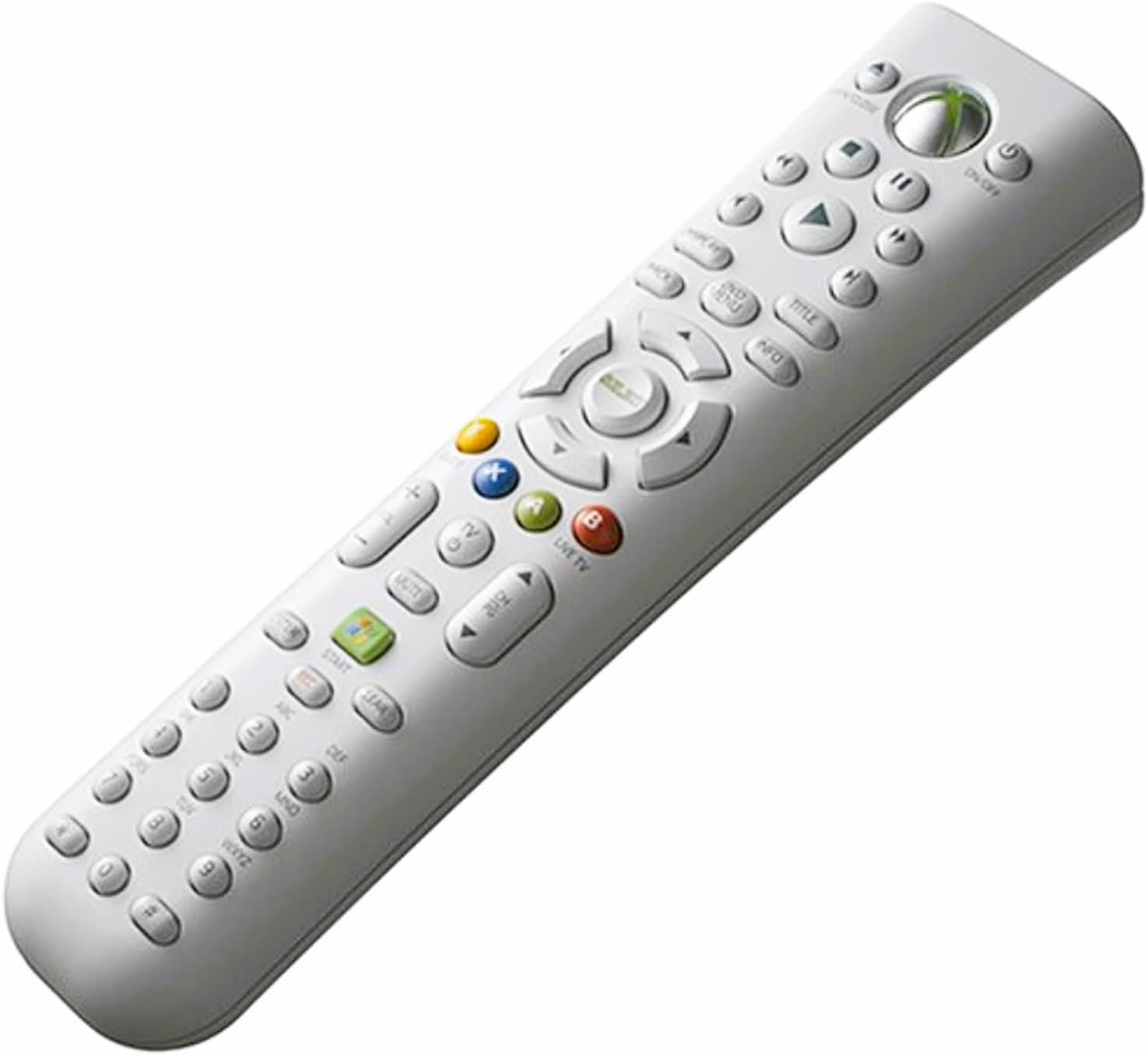
Xbox 360 Universal Media Remote
Product ID: 438673
🎮Universal control
📺TV compatibility
🔊Volume control
🎉 Elevate your gaming experience with effortless control!
The Xbox 360 Universal Media Remote offers a convenient way to control your Xbox 360 system and other devices from the comfort of your couch, featuring easy navigation, multimedia controls, and universal compatibility.
| ASIN | B000B6MLSM |
| Additional Features | Backlit, Universal |
| Battery Type | Alkaline |
| Best Sellers Rank | #34,407 in Video Games ( See Top 100 in Video Games ) #6 in Xbox 360 Remotes |
| Brand | Microsoft |
| Button Quantity | 43 |
| Color | gray |
| Compatible Devices | Xbox 360 |
| Connectivity Technology | Infrared |
| Controller Type | Button Control |
| Customer Reviews | 4.0 4.0 out of 5 stars (632) |
| Global Trade Identification Number | 00115971252881, 00882224023818 |
| Item Weight | 0.63 Pounds |
| Manufacturer | Microsoft |
| Maximum Number of Supported Devices | 1 |
| Maximum Range | 30 Feet |
| Mfr Part Number | B4O-00001 |
| Model Name | B4O-00001 |
| Model Number | B4O-00001 |
| Number of Batteries | 2 AAA batteries required. |
| UPC | 882224023818 115971252881 |
E**I
Good remote for your Xbox media center
The Xbox 360 can play DVDs, downloaded videos, videos streamed from your PC, Windows Media Center integration, Netflix integration, and don't forget music playback and picture viewing. With all this, the standard wireless gamepad isn't up to the task. It times out and powers off after a few minutes, leaving you waiting... and waiting... and waiting for it to reconnect if you want to simply pause your video, much less do anything more complicated. Even then you have to navigate the on-screen menus and it's generally inconvenient. This is where the Xbox 360 Universal Media Remote comes in. Don't buy this remote if you want a real "universal" remote. Beyond controlling the Xbox, it can barely do much more than turn on your TV and change the input. But as an affordable solution for controlling media playback on your Xbox it is perfect. It has all the buttons you'd want, and because it works by IR instead of wireless, it responds instantly and the batteries will last a long time -- just like any other standard remote. You do of course have to point it at your Xbox to work. The area in which it will pick up the signal is wide enough that you won't have to worry about pointing it at just the right spot, like I've had to do with some DVD players I've owned. The buttons light up so you don't have to struggle to find the function you want in the dark. If you're like me and use your Xbox 360 to watch a lot of stuff and want a good reasonably priced remote to replace the wireless gamepad, get it. With it, my Xbox has easily replaced my upscaling DVD player. If you want a truly universal remote that controls everything in your living room, look elsewhere, like the Logitech Harmony series.
J**G
Remote works get!
This remote works great. It controls the xbox, and all the apps on the xbox including Netflix, Hulu, and Media Center. Now my wife can watch here shows on Netflix and Hulu and not run the batteries down on my game controllers. I like the fact that you only have to hit the On/Off button to turn on and off the Xbox. No more holding the Big X button down for ever. I also like that it can control the TV also. It took me a while to get the code for the TV to work, but after about 10 minutes of making it automatically scan for the code, I finally got it to lock one in that would work for the power, channel, volume, and the input. I didn't take away any stars for it, but it won't control the volume on my surround sound, which I knew before buying it but it would still be nice. We watch a lot of digital movies, that get from copying our Blu-Rays, on the Xbox and before with the game controller I couldn't fast forward or rewind when watching the movies via Media Center. With this remote I can, but instead of using the fast forward and rewind buttons, you have to short press the skip forward and back buttons. It isn't a true fast forward, as it will only skip forward a minute and some change and you can't stop on a particular spot, but at least you can go forward if you accidentally hit Restart Movie and you were half way through it. It also has back lit keys so you can see what buttons you are pushing if you are watching a movie in the dark. I chose this one over the new remote that Microsoft has out, even though the new one matches my Elite, because of the the back lit keys, the Media Center Button,and it has been reported that the new one tends to lose connection especially if you don't point it right at the Xbox. This one doesn't need to be point right at the Xbox, just in the general direction. All in all, this controller is great, and not picking up a dead gaming controller all the time is an added bonus for me. I definitely recommend this remote.
B**S
Remote Control Collection!
I like remote controls! In fact, I like remote controls so much that I have acquired quite the large collection of them. If you come into my house and walk into the living room, you will find that my entire coffee table is covered with dozens and dozens of remote controls. The majority of these remote controls are touted as "universal". But what is universal, anyway? Some may think that a universal remote control should work with any device, anything and everything which is electronic and can be controlled with a remote. You know what I say to that? Phooey! Universal remotes never work with every device, silly! Don't you know that "universal remote" is an oxymoron?! But is the Xbox 360 Universal Media Remote the exception? This remote controls it all, doesn't it? Wrong! The Xbox 360 Universal Media Remote controls my Xbox 360, as do the four wireless Xbox 360 controllers sitting on my coffee table among the array of other universal remotes. What else does the Xbox 360 Universal Media Remote control? Well, I'm able to control TV's volume, channels, and power. There's at least 23 other universal remotes on the coffee table that do that job as well. Was the Xbox 360 Universal Media Remote easy to program? Heck no! Why not? Well first off, the manual that comes with the Xbox 360 Universal Media Remote doesn't have codes for individual TV brands so it can be easily programmed to work with the TV right off the bat. The instructions state that I could get those on the Xbox 360 support website, but let me tell you this: no amount of my searching on Xbox website could turn up said TV codes. I did find a webpage which was basically a copy of my manual which stated that I could go to the website to find the codes, but was there a link to this area? What do you think? The instructions also stated that if I could not find my TV code, I could blindly program the device by pushing one of the buttons repeatedly to see if anything happened with my TV. Once my TV changes a channel or powers off, I will then have discovered the unknown code for my TV and could expect that the remote will work from that point forward, allowing me to move on from there. After trying this method for an hour or so and having no luck with it, I called the Xbox 360 telephone support people. "I bought an Xbox 360 Universal Media Remote and I need the code to make it work with my Sony television." This is a simple request, right? Apparently not so uncomplicated for the Xbox 360 support team. First off, the person I spoke with could barely speak English, let alone understand it. Then when I finally got the point across, she acted like she didn't know what an Xbox 360 Universal Media Remote was. She thought I was talking about the wireless controller and that the controller should just "work" without a code. No, no, no! When I finally was able to make her understand that I had the Xbox 360 Universal Media Remote, she stated that those codes could be found on the Xbox 360 support website. I assume she read this answer from her computer monitor after she finally typed in the correct problem issue, but nevertheless, she still acted as if she never knew an Xbox 360 Universal Media Remote existed before that point. I explained I could not find said codes on their website, and believe it or not, the girl could not come up with a code for me and had to transfer me to a level two support tech. After much rigmarole, placing me on hold repeatedly while searching by the Xbox 360 level two support tech for nearly an hour, I was finally given a few codes and one of them actually worked. And now you know what it takes to complete the process of programming this remote! Meanwhile, I have added yet another universal remote to my collection; the unique one out of the five devices I currently own that control my Xbox 360 (as the four wireless controllers already perform many if not all of the functions on the Xbox 360), and the only white one out of 24 other remotes that control most of the primary functions on my television. Do I need the Xbox 360 Universal Media Remote for any reason? Probably not. Well, no; I absolutely do not need it. Not at all.
A**R
xBox Universal Media Remote
We added cable after years on antenna, then added PC quad tuner and cableCARD, so now we navigate our channels through Windows Media Center (WMC) on our television screen. It is a huge improvement, allowing us to edit the program guide to suit our needs, omitting non-subscribed channels, duplicate listings and such. This setup also added whole-house DVR function, and we can go to recorded programs through WMC, as well. We were able to navigate the new setup with an xBox game controller, so this type of remote is not an actual necessity. I bought it because I picked up a used xBox (with bad disk drive) for the exclusive purpose of serving up cable on a second TV set. Used xBox did not include any controllers, and I knew it would not be used for gaming (re: bad disk drive), so I decided this remote would be more suited for that xBox. It works very well. This remote controls the xBox and the TV. The rectangular green button is a hot key into WMC, so I don't even go through the xBox dashboard. Once I'd used this, the game controller felt clunky for navigating in WMC. I found myself bringing the remote from that "second" TV to the our main set. That was an imperfect fix, as I didn't want to "un-synch" the remote from the TV for which I bought it, but I missed being able to control volume on the main set using the single device. Bought a second remote, exact same item. Both still work beautifully. Only difference was that the remote didn't synch as easily with our Panasonic TV as the first had with the Toshiba. Not a problem; we entered codes found on the xBox support site and found the right one for our set. That was the only inconvenience, and it was short-lived. This remote was reasonably priced and I like it for getting around in WMC on a TV screen. Each device is also synched with its respective TV, one automatically and one manually. Obviously . . . I would (did) buy again.
B**N
Very Good, Especially For The Price--And It Controls My Vizio TV!
Ok, now that I actually have one of these remotes I can give a first hand review. I only paid about seventeen dollars delivered from Amazon.com for this remote. It arrived on time and very well packaged. A couple of reviewers complained that this remote wouldn't operate their Vizio TV. I was concerned about this but for the price I decided that if it didn't operate my Vizio it was still worth while just for the convenience of using a proper remote versus using the game controller for watching a DVD or a Netflix download. There were no programming codes available in the included instructions[...]. Unfortunately, there isn't a listing for Vizio. This is quite an oversight by Microsoft considering that Vizio is currently either the most popular brand name or very close to it for flat panel TVs in the U.S.. But whatever, it does include instructions on how to let the remote search for the proper code. That's what I did and it worked fine. Basically, you push the channel button and it scrolls one at a time through all possible codes. I don't know how many codes there are but it only took a few tries to find a code that would turn my Vizio on and off and control the volume. Unfortunately, I never did find a code that would also include the proper function of the, "Input" button. I did find one code that allowed the, "Input" button to select, "RGB" input but no others so it was useless. So, in order to change from, "HDMI1" to, "HDMI2" I have to use the original remote that came with the TV. But that's ok since I didn't buy this remote for any other purpose than to allow me to watch a movie via the XBox 360 and control the volume of the TV at the same time. It comes with 2 Duracell AA batteries. I have very large hands so for me the remote is a little too narrow. But it's acceptable and the rest of my family thinks it fits their hands just fine. The back-lighted buttons are a great feature. When operating my TV the IR output is very strong. I can change the volume by pointing in nearly any direction. It's almost like an RF remote. When operating the XBox 360 it's a bit more picky where you point it but it's not bad. It doesn't have to be pointed exactly at it but I'd say within maybe 10 or 15 degrees. So far it hasn't been a problem for me. I think this is more a function of the quality/placement of the IR receiver, (TV, XBox, etc.) than of the quality of the IR transmitter, (The remote). Regardless, it's very acceptable for me. For operation of the XBox 360 the remote works quite well. It's so much more convenient that using the game controller. If that was all it did it would be well worth the price for me. I haven't yet used it to control Windows Media Center functions on my computer since I haven't yet connected it directly to my computer. I access XBox Live via a wireless connection directly from my wireless modem. I plan to use a long Ethernet cable to access my computer's Windows Media Center files and when I do I'll update this review to include those functions. There are 4-way arrow buttons with a center, "Ok" button that works for nearly everything associated with the XBox 360 dashboard and anything related to navigating a menu while watching a video. These 4 arrow buttons take the place of the left analog joystick on the game controller with the, "Ok" button acting as the green, "A" button. There are a few situations where I would normally use the right analog joystick on the game controller but there isn't anything like this on the remote control. Specifically when there are two windows on the screen at the same time. With the game controller the left analog joystick will control the left side and the right will scroll up and down on the right side. An example of this would be in the Netflix menu, sometimes. But this is a very minor issue for me that I can easily live with. It's not supposed to take the place of a game controller for all functions and so far it has been successful with nearly all XBox functions that I've asked of it. I've seen some complaints about this remote. Some have said it won't control their TV, specifically their Vizio. I wonder if these people went all the way through the hundreds of codes available in search mode. I don't think I went through them all and I came across at least a dozen codes that would operate my TV volume, mute, channel, and power buttons. I don't think I went through them all though. I kept track by counting the variations in how many times I had to push the button between acceptable codes. But MS REALLY should include codes for Vizio at least on their website and preferably inside the package. Another complaint I saw was regarding the printing on the buttons wearing off. Yeah, it would be nice if that didn't happen but in my experience this is a common problem with all sorts of remote controls, even some that cost far more than this one did. The remote that came with my Dish Network DVR receiver had the printing wear off in just a couple of months and it costs several times what this remote costs. No problem. It's not hard to remember the buttons. If I use them enough to wear them off I certainly use them enough to memorize them. I've already memorized the buttons on the XBox 360 remote, or at least the ones I use right now. Just like with my other remotes, I operate them by touch, not by sight. All in all I say that this is a great deal for a decent product. Could it be better or do more? Sure, but I wouldn't expect it to do anymore than it does for the price. Knowing what I know now I would be willing to pay more for this than I did if I had to.
D**E
"Universal" is a misnomer, good for movies on the Xbox 360
I should have read up on this remote a little more before purchasing it. I guess "universal" means something different to me. What you get is a great remote for watching DVD's, Downloaded Zune Marketplace videos, media center videos, or Netflix videos on the Xbox. What you don't get is a remote that does anything for a basic sound system and does nothing but the very basics (on/off, volume) for most televisions. Also, the remote requires a direct line of sight to the Xbox 360 to work at all. I was disappointed, but it is pretty cheap and it does do great with the Xbox so I can't take away more than 2 stars.
X**Z
Perfect for ME :)
I ordered this for one reason, and mainly one reason alone! I hated having to use the controller to watch my DVDs and NetFlix. I would set it down, and the trigger would set off and BAM I just fast forwarded a scene and had to ruin the flow of the movie to go back to the same spot. The controller was my way of keeping the controller away from me and still being able to pause and whatever I wanted to. VERY EASY setup. In fact if I can remember right... none was required. I still have not tried to set the remote to the TV to turn it on/off, but that's what the tv remote is for. Plus, based on experiences in the past, I can guess that this remote won't work for my tv anyway. I have tried using universal remotes for my tv in the past that all failed. Only solution was to go to the manufacturer website and order one specifically for my tv. So, if there are problems programming the remote to the tv, I don't know; I haven't tried nor will I. But the instructions to do so are just like any other universal remote. Enter the code, and press this and that until you find the right one. Works perfect, controls EVERYTHING and I'm pretty sure if you wanted to, you could even play a game with it. Has all the functionality of a controller in the convenience of a remote. -------------------------------- Only thing I have read in other reviews and I noticed myself. It does have a distance of about 10ft before it doesn't work. Luckily I am in that range, but have noticed the cut off distance too. Other than that, this has definitely made me a lot happier. If tonight is movie night, forget the controller and pull out the remote.
G**S
so this should be pretty easy, but this thing is ridiculous
This really was a UNIVERSAL remote: use any button and it semi works for xbox 360 but it will ALSO turn off your TV for you! We also received instructions in every language but English. Not that English instructions will help you (We luckily speak one of the languages of the received instructions, but the instructions in any language do NOT provide setup instructions!!!). We ended up having to find instructions on Youtube. So be prepared for the remote to turn off the TV EVERY time you try to use it for the Xbox. Every. Single. Time. Not to mention half the controls do not work, or work sporadically. And if you decide to ignore this review and buy this remote, just know that unlike the wireless controller this remote is a line of sight device and needs to be pointed precisely at the IR window at the front of your Xbox 360. Also go ahead and clear an hour or two to individually try up to 50-60 codes or more depending on your TV's manufacturer. It is a remote and it is also 2014, so this should be pretty easy, but this thing is ridiculous. Spend a little more money and buy the wireless controller.
N**E
Five Stars
Excellent, great value, packaging good, arrived quickly
S**N
I will definitely buy from this seller again
Awsome remote very happy
T**A
Must have!
Perfect condition, use it more than the controllers!
B**E
Just The Job
This remote fills the bill for what I wanted. Turns on the TV and has a button to activate the Xbox and start Windows Media Centre. Does all as advertised.
B**E
Two Stars
Après 2 mois il ne contrôleplus la tele seulementle volumefonctionne
Trustpilot
2 days ago
1 month ago